Button
Use the button component to help users carry out an action like submitting a form. You should avoid using buttons for simple links. Use regular text links instead.
Write button text in sentence case, describing the action it performs. E.g. “Save and continue” rather than “Submit”.
How it works
Primary buttons should be used for the main action, such as submitting a form. Align the primary action button to the left edge of your form.
<button class="cads-button cads-button__primary" type="button">
  Primary button
</button><%= render CitizensAdviceComponents::Button.new(variant: :primary) do %>
Primary button
<% end %>
Secondary button should be used for secondary calls to action. Typically there should be only one primary button and one secondary button within a form. Before adding more than one secondary button, reconsider how you are structuring your design and try to break it down or make it simpler.
<button class="cads-button cads-button__secondary" type="button">
  Secondary button
</button><%= render CitizensAdviceComponents::Button.new(variant: :secondary) do %>
Secondary button
<% end %>
Tertiary buttons are used for turning something on or off instantly on a page – for example, references and “Expand all” actions.
<button class="cads-button cads-button__tertiary" type="button">
  Tertiary button
</button><%= render CitizensAdviceComponents::Button.new(variant: :tertiary) do %>
Tertiary button
<% end %>
Link buttons are styled to look like hyperlinks. Use these when you want a button to draw less attention, or when you would prefer to have a text styling but the action changes state such as deleting an item or logging out a user.
<button type="button" class="cads-linkbutton">Link button</button>
<br>
<button type="button" class="cads-linkbutton__regular">Regular link button</button>
Using buttons with icons
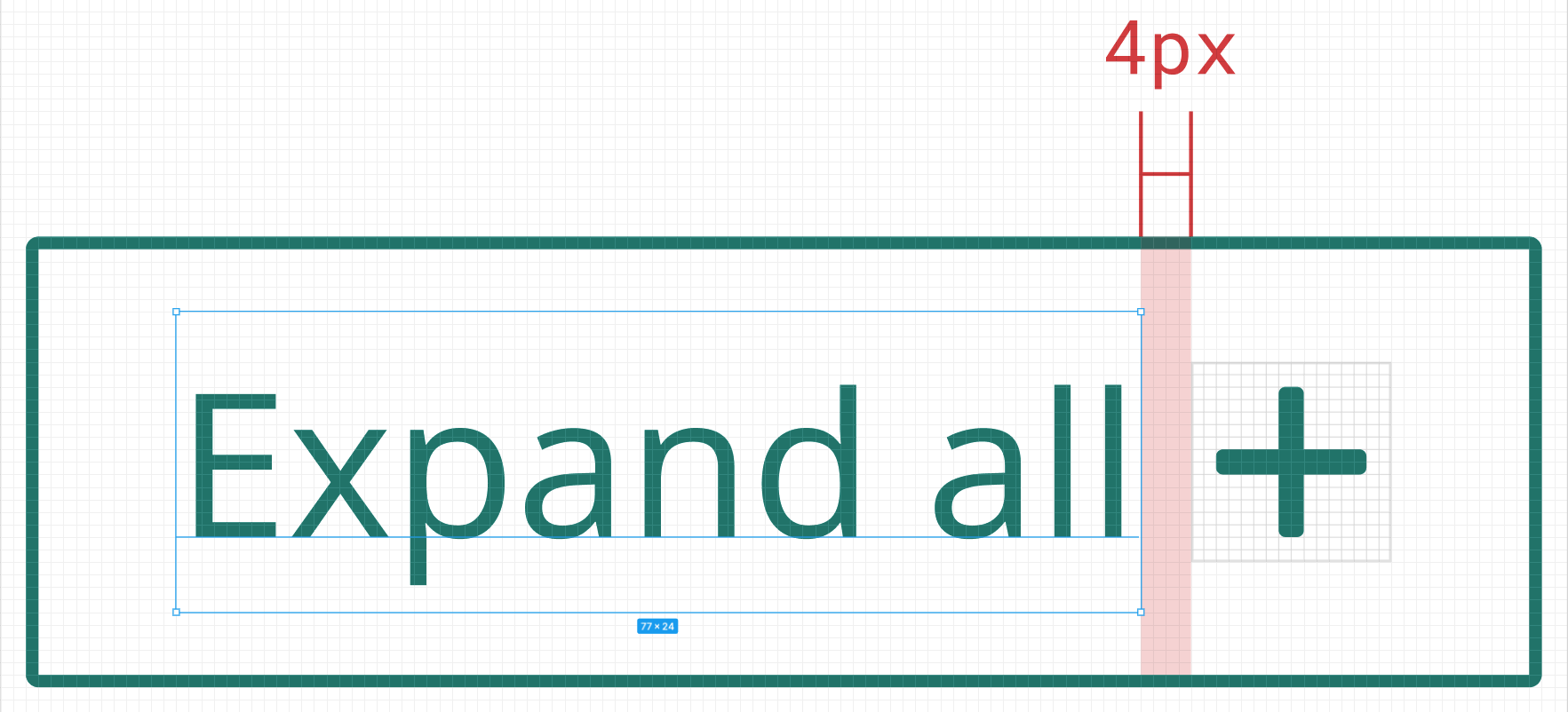
Icons can be placed next to the button label to clarify an action or call attention. Buttons can be used with either a left or right aligned icon.
The spacing between an icon and the button text should be 4px. Use the small icon (16px) within a button.
The icon must be the same color value as the text.
Previous / next
We use “Next” and “Previous” buttons in a multi-step form to help users navigate between pages.
They are:
- aligned to the left so users do not miss it
- the primary button “Next” should come first
- the secondary button “Previous” is aligned below so the arrows don’t point to each other, which would be confusing
<form action="/" accept-charset="UTF-8" method="post">
  <button class="cads-button cads-button__primary" type="submit" data-example="true">
    Next
    <span class="cads-button__icon-right"><svg xmlns="http://www.w3.org/2000/svg" viewBox="0 0 16 16" class="cads-icon cads-icon--small cads-icon--arrow-right" focusable="false" aria-hidden="true">
        <path d="M11.73 8 7.727 3.94a.57.57 0 0 1 0-.804l.956-.97a.56.56 0 0 1 .794 0l5.36 5.43a.569.569 0 0 1 0 .806l-5.36 5.43a.564.564 0 0 1-.613.124.555.555 0 0 1-.181-.123l-.956-.97a.57.57 0 0 1 0-.804l4.005-4.06Z" />
      </svg></span>
  </button>
  <br>
  <button class="cads-button cads-button__secondary" type="submit">
    <span class="cads-button__icon-left"><svg xmlns="http://www.w3.org/2000/svg" viewBox="0 0 16 16" class="cads-icon cads-icon--small cads-icon--arrow-left" focusable="false" aria-hidden="true">
        <path d="m4.27 8 4.005-4.06a.569.569 0 0 0 .122-.62.569.569 0 0 0-.122-.184l-.956-.97a.56.56 0 0 0-.612-.123.56.56 0 0 0-.182.124l-5.36 5.43a.569.569 0 0 0-.122.62c.028.07.07.132.122.185l5.36 5.431a.563.563 0 0 0 .397.167.555.555 0 0 0 .397-.167l.956-.97a.57.57 0 0 0 .122-.62.57.57 0 0 0-.122-.184L4.27 8Z" />
      </svg></span>
    Previous
  </button>
</form><%= form_with url: "/" do |form| %>
<%= form.cads_button "Next", icon_right: :arrow_right, attributes: { "data-example": true } %>
<br>
<%= form.cads_button "Previous", variant: :secondary, icon_left: :arrow_left %>
<% end %>
In different contexts, you can use primary and secondary buttons side by side. Your team should design this based on the user needs and context of the service.
Accessibility
Buttons have a clear :focus style when tabbing or focussing on the button
When selecting a button, it will depress slightly to give users visual feedback that an action has taken place.
Use <input type=submit> or <button> elements depending on if the button submits a form, or performs an interaction. Do not use anchor tags with an empty href when you want a button <a href=”#”>. Read more about why the empty href is a bad thing.
Using with Rails
When using with Rails we recommend using the CitizensAdviceComponents::FormBuilder form builder which provides a cads_button helper:
<%= form_with url: "/" do |form| %>
  <%= form.cads_button "Next", icon_right: :arrow_right, attributes: { "data-example": true } %>
  <br>
  <%= form.cads_button "Previous", variant: :secondary, icon_left: :arrow_left %>
<% end %>This helper accepts the text for the button along with a variant and icon_left or icon_right properties to configure the button. The icon values can be a reference to any of the included icons but typically either :arrow_right or :arrow_left. Custom attributes can be passed through to the button with the attributes property.
View component version
We also provide a standard view component version of the component for use outside of a form context. The view component accepts an icon_left or icon_right slot for buttons with icons.
<%= render CitizensAdviceComponents::Button.new do |c| %>
  Next
  <% c.with_icon_right do %>
    <%= render CitizensAdviceComponents::Icons::ArrowRight.new %>
  <% end %>
<% end %>

<%= render CitizensAdviceComponents::Button.new(variant: :secondary) do |c| %>
  Previous
  <% c.with_icon_left do %>
    <%= render CitizensAdviceComponents::Icons::ArrowLeft.new %>
  <% end %>
<% end %>| Argument | Description |
|---|---|
Argument
variant
|
Description
Either :primary, :secondary, or :tertiary. Defaults to :primary
|
Argument
type
|
Description
Either :button or :submit. Defaults to :button
|
Argument
attributes
|
Description Additional attributes are passed to the button |
Questions and contributions
For National Citizens Advice staff you can find us in the #design-system channel on Slack. For open issues, roadmap, and source code see the GitHub project.